
Today, I am going to write blog about NopCommerce Theme integration and customization.
This blog is helpful to newbie of NopCommerce and those who have started learning NopCommerce.
First a fall download Solution from NopCommerce website. Once download, open solution on Visual Studio.
Once done, Setup and Installation of NopCommerce on your system. Browse website will be landed on home page of NopCommerce. It looks like nice and pretty layout Theme provided by NopCommerce.
So now time to integrate new Theme and Customize it.
Theme folder path in Solution-->Presentation-->Nop.Web-->Themes. Under themes folder looking "DefaultClean" theme which is provided with solution.
For example I have downloaded "NopShop" theme and copy and paste under the themes folder. Look like image ref.

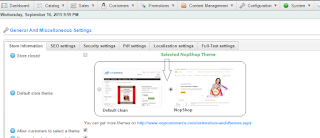
Once new theme "NopShop" folder populate under Themes folder. Browse website and login to admin section and go to Admin-->Configuration-->Setting-->General and miscellaneous settings-->List theme names.
Here user can select the theme name which theme want to integrate on solution.
This blog is helpful to newbie of NopCommerce and those who have started learning NopCommerce.
First a fall download Solution from NopCommerce website. Once download, open solution on Visual Studio.
Once done, Setup and Installation of NopCommerce on your system. Browse website will be landed on home page of NopCommerce. It looks like nice and pretty layout Theme provided by NopCommerce.
So now time to integrate new Theme and Customize it.
Theme folder path in Solution-->Presentation-->Nop.Web-->Themes. Under themes folder looking "DefaultClean" theme which is provided with solution.
For example I have downloaded "NopShop" theme and copy and paste under the themes folder. Look like image ref.

Once new theme "NopShop" folder populate under Themes folder. Browse website and login to admin section and go to Admin-->Configuration-->Setting-->General and miscellaneous settings-->List theme names.
Here user can select the theme name which theme want to integrate on solution.

Now time to result on front end. Front end design will look change with new selected theme.
Once successfully integrated theme. Now time to customize it
If you need to change any view html, copy that view file from ~/Views/FOLDER_NAME/VIEW_NAME.cshtml and paste it under ~/Themes/NopShop/FOLDER_NAME/VIEW_NAME.cshtml. For example, if you want to change the html code in ~/Views/Shared/_ProductBox.cshtml, copy that file and paste it under ~/Themes/NopShop/Shared/_ProductBox.cshtml.
If you do not need to change any view html, then modifying ~/Themes/NopShop/Content/styles.css is enough. (Also make sure you update ~/Themes/NopShop/Views/Shared/Head.cshtml to point to your NopShop theme CSS)
NopCommerce always first look for the specif view in your theme (NopShop). if it can't find than it will look into the original view at ~/Views folder file. So it means your theme view override with default views folder view.
Hope you enjoy it and like it.


